Retrieve xAPI Data
The Retrieve xAPI Data node fetches existing xAPI (Experience API) statements from a Learning Record Store (LRS) or internal database. It allows workflows to query and retrieve learner activity data, assessment results, and learning history based on specific criteria such as verb ID. This node is essential for creating adaptive learning experiences, generating progress reports, analyzing learner behavior, and building personalized learning paths based on historical data.
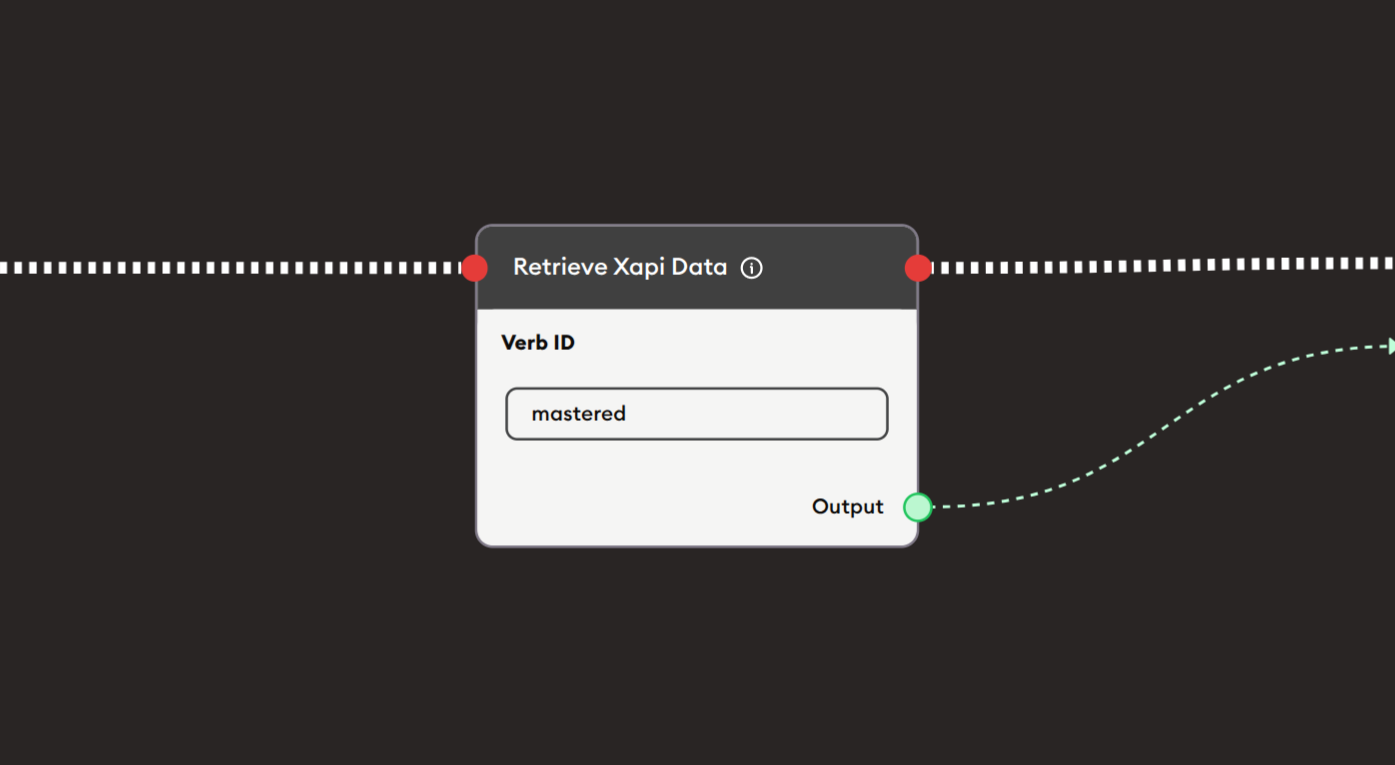
Basic Usage
Use the Retrieve xAPI Data node to query and fetch xAPI statements from stored learning records. Configure the verb ID filter to retrieve specific types of activities, connect the output to process the retrieved data, and use it to make decisions or display information in your workflow.
Inputs
The Retrieve xAPI Data node does not have input ports for receiving data from other nodes. It queries the LRS/database based on its configuration settings.
Outputs
Output (Green Port)
Retrieved xAPI Data: Outputs the fetched xAPI statements as structured data.
- Connects to green input ports of subsequent nodes
- Contains array of xAPI statement objects
- JSON formatted learning records
- Includes all statement components (actor, verb, object, result, context)
- Can be filtered and processed further
Output Data Structure:
- Statement ID
- Actor information (learner details)
- Verb (action performed)
- Object (activity details)
- Result (scores, completion, evidence)
- Timestamp
- Context information
Output (Red Port)
Flow Control: Continues execution to the next node after data is retrieved.
- Connects to red input ports of subsequent nodes
- Standard flow progression
- Triggered after successful data retrieval
- Allows workflow continuation
Configuration
The Retrieve xAPI Data node provides filtering options to query specific xAPI statements:
Verb ID
Text input field to filter statements by verb identifier.
- Filter by specific xAPI verb
- Uses standard xAPI verb IRIs
- Case-sensitive matching
- Optional field (leave empty to retrieve all)
- Example:
mastered
Common Verb IDs:
completed- Activities that were completedpassed- Assessments that were passedfailed- Assessments that were failedmastered- Competencies that were masteredattempted- Activities that were attemptedexperienced- Content that was experiencedanswered- Questions that were answeredinteracted- Interactive elements engaged withwatched- Videos or content watchedread- Content that was read
Purpose:
- Narrow down retrieved statements
- Focus on specific activity types
- Query learning outcomes
- Filter by assessment results
- Track specific interactions
Example Workflows
Check Learning Completion Before Proceeding
Scenario: Retrieve learner's completion status and adapt the learning path.
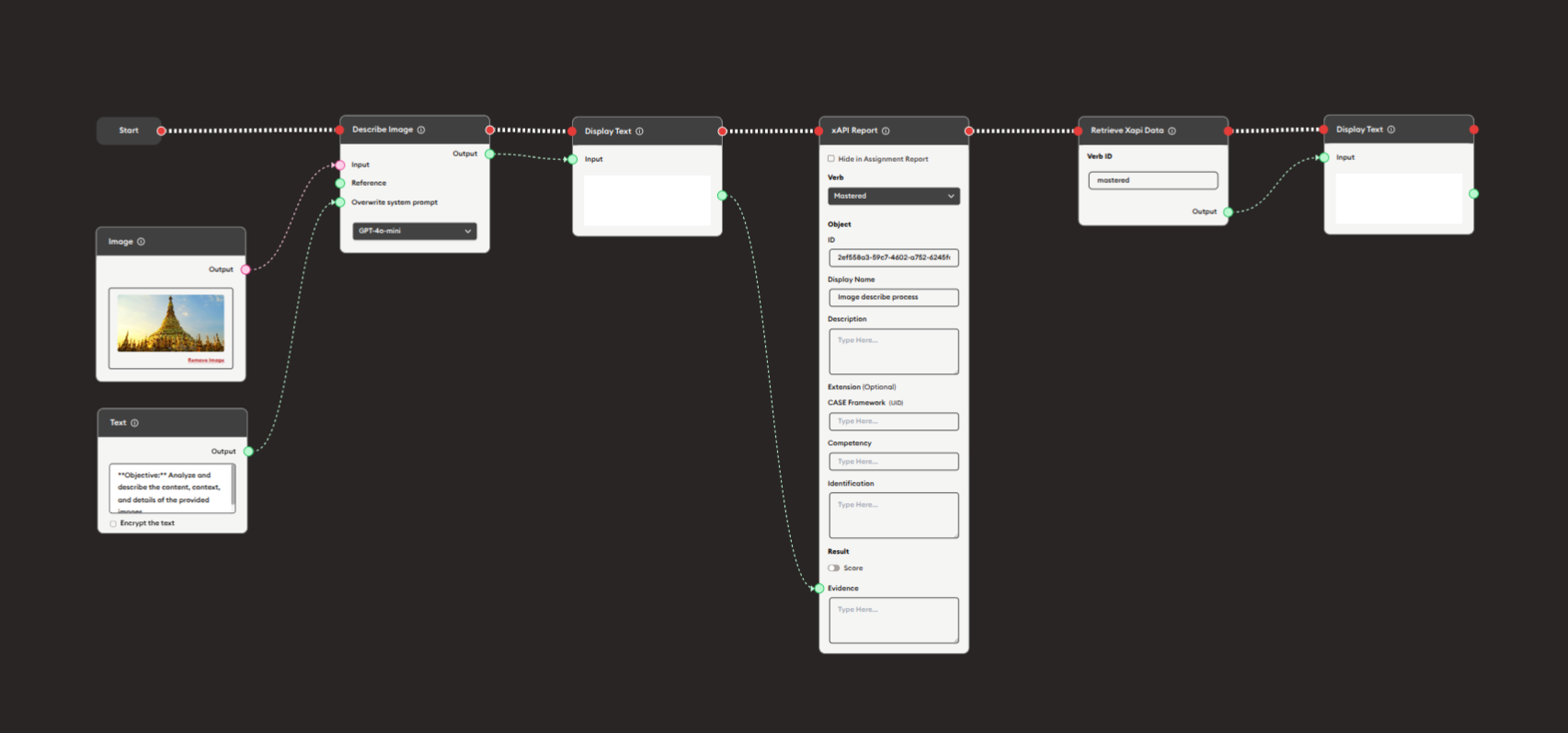
Steps to Create the Flow:
-
Add a Start Node.
-
Add earlier learning activities:
- Image node (learning content)
- Text node (instructions)
- Describe Image node (AI interaction)
- Display Text node (show results)
- xAPI Report node (track "mastered" verb)
-
Add a Retrieve xAPI Data node:
i. Configure the query:
- Verb ID:
mastered - This retrieves all activities where learner demonstrated mastery
- Verb ID:
-
Add a Display Text node:
- Connect Retrieve xAPI Data output to Input
- Display the retrieved mastery records
- Shows learner's achievements
-
Connect flow control:
- Start → Learning Activities → xAPI Report → Retrieve xAPI Data → Display Text (red ports)
Preview:
[Start] → [Learning Activity: Image analysis]
       → [xAPI Report: Record "mastered" status]
       → [Retrieve xAPI Data: Query "mastered" activities]
       → [Display Text: "You have mastered: {list of activities}"]
Result: The workflow tracks when learners master content, then retrieves and displays their mastery achievements.
Related Nodes
- xAPI Report: Create and send xAPI statements to LRS
- Display xAPI Content: Display SCORM/xAPI packages
- Data Dump: Store retrieved data for later use
- AI General Prompt: Analyze retrieved learning data
- Text Join: Combine multiple xAPI query results
- Branching Node: Make decisions based on retrieved data
- Display Text: Show learning history to users
Summary
The Retrieve xAPI Data node is essential for leveraging learning history:
✓ Query: Fetch historical xAPI statements from LRS
✓ Filter: Use verb ID to target specific activity types
✓ Analyze: Process learning data for insights
✓ Personalize: Adapt experiences based on history
✓ Report: Build progress dashboards and analytics
Master the Retrieve xAPI Data node to create intelligent, adaptive learning experiences that leverage learner history for personalization, provide progress insights, verify prerequisites, build competency portfolios, and enable data-driven educational decision-making.